更新时间:2026年8月3日
问题:有很多来新加坡和中国的虚假流量
2025年9月份中下旬开始,大量的GA4网站账户出现异常的流量激增。这些流量的地理来源高度集中,主要来自新加坡和中国如: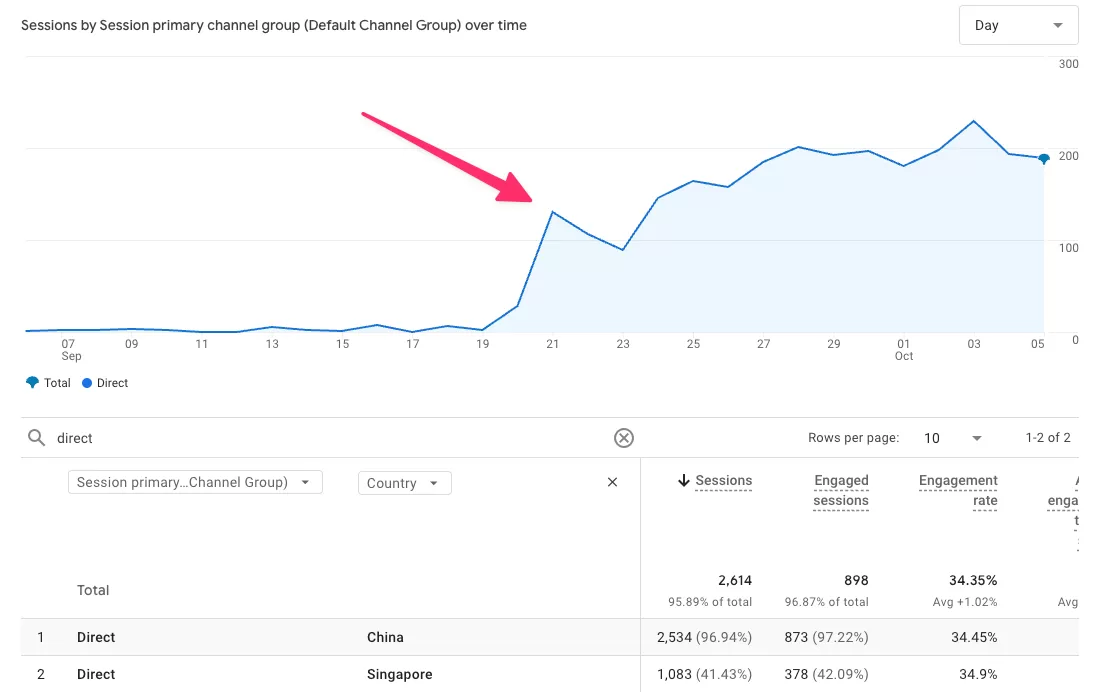
其行为模式高度一致,呈现出典型的机器人流量特征:会话时长极短、无用户交互事件、设备信息异常等。
原因分析
经排查,这并非自然流量的增长,而是一场新型的、大规模的虚假流量攻击。
- Google 官方团队已确认:这是一种 新型机器人流量模式,GA4 现有的标准过滤器(包括“排除已知漫游器”和“验证 Google Ads 流量”)目前无法自动识别和过滤此类流量。
- 行业普遍推测,该活动可能与大语言模型(LLM)的数据抓取有关,目的为收集网络内容用于 AI 训练,这解释了其庞大的规模和持续性。
Google官方建议与临时解决方案
Google 官方团队已确认该问题,并正在开发长期修复方案以增强机器人流量过滤能力。在此之前,官方提供了以下临时解决方案:
1. Understanding the increase in inauthentic trafficThe recent, sudden spikes in traffic are likely due to a new, targeted form of inauthentic, non-human traffic (bots) that is currently bypassing our standard filtering systems.These spikes are correlated with low-quality session metrics, specifically:
- Extremely low engagement: Sessions with only initial events (session_start, page_view) and no further user interaction.
- Anomalous data: Unusual concentrations of traffic from older device/OS profiles, or sudden spikes from unexpected countries/cities, often labeled as (not set).
While our concerned team has confirmed the issue, and we already filter self-identifying bots, they are actively working to improve our protection capabilities to ensure you receive the most accurate data.2. Immediate action: viewing data without spamThe recommended immediate step is to create Segments in Explore reports. This action only affects how you view the data and ensures no valid traffic is permanently excluded.The process:
- Identify the spam pattern: Use the explore section and post-processed dimensions (like geographic info) to find the “fingerprint” of the spam. Look for patterns such as:
- High traffic from a specific country/city paired with extremely low engagement (e.g., Session Duration < 10 seconds).
- Unusual concentrations of specific technical profiles or violations of event logic.
- Create an exclusion segment: Build a user or session segment in the explore builder with the necessary conditions (e.g., exclude sessions where country = ‘Singapore’ and session duration < 10).
- Apply to reports: Apply this exclusion segment to any exploration report you use for analysis to immediately view your clean data.
While we develop an immediate workaround, we want to assure you that we are tackling the root cause. We are actively addressing gaps in our bot traffic filtering that are skewing data and inflating GA360 billing. A long-term spam detection fix is in development.
GA4排除
不要直接删除或永久排除原始数据,以免误杀真实流量。建议通过探索报告中的细分进行临时过滤。
GTM端主动拦截(高级补充方案)
如果你希望更早地在数据采集层面进行拦截,我建议是在GTM可以获取用户的设备信息,将有异常的进行屏蔽,根据我的经验:
- CPU的核心数量,如有超过 100 个
- 屏幕分辨率,如有一些异常分辨率
延伸阅读:
- GA4上排除来自urlumbrella的虚假流量
- GA4上屏蔽来自gtm-msr.appspot.com的虚假流量
- https://support.google.com/analytics/thread/378622882/google-analytics-4-bot-traffic-increase-from-china-singapore-on-wordpress-sites?hl=en